
.png)
.png)

.png)
.png)


Gaming Monitors Buying Guide
Last reviewed: October 2026 - Chillblast team
Match the monitor to the graphics card in your PC, not the biggest number on the box. For most gaming PCs that means a 27-inch 1440p (2560x1440 pixels) panel at 165–240Hz; dual-mode panels let one monitor do 4K and high-refresh esports without a compromise.
| Best all-rounder | View details | View product | |||
| One monitor that does everything | View details | View product | |||
| Best immersion per pound | View details | View product | |||
| Esports frames first | View details | View product | |||
| Big single-player or desk multitasking | View details | View product |
Does my graphics card decide which monitor I buy?
Yes - more than size, brand or price. Your PC’s frame rate (fps, frames drawn per second) has to match the panel’s refresh rate (Hz, frames shown per second): a 240Hz monitor fed 90fps looks like a 90Hz monitor.
| RTX 5060/ 5060 Ti | View details | View product | |||
| RTX 5070 | View details | View product | |||
| RTX 5080 | View details | View product | |||
| RTX 5090 | View details | View product |
What do refresh rate, response time and resolution mean?
• Refresh rate (Hz): how many times per second the panel redraws. Moving from 60Hz to 144Hz is the single biggest felt upgrade in gaming; 144/240Hz shows mostly in fast competitive titles.
• Response time (ms): how fast a pixel changes colour. Look for a grey-to-grey (GtG) figure - the honest measurement; “1ms MPRT” is a motion-blur marketing number. Every monitor Chillblast stocks is listed at 144Hz+ with 1ms-class response.
• Resolution: 1080p (1,920x1080) is the esports default; 1440p is the 2026 value sweet spot at 27”; 4K (3,840x2,160) roughly doubles the GPU load of 1440p, so only buy it with a card that can feed it.
• Adaptive sync (G-Sync / FreeSync): stops tearing when frame rates dip below refresh. Current NVIDIA cards work with certified FreeSync panels, so check the certification your GPU supports, not the sticker.
| Panel | Strengths | Weaknesses | Pick it for |
|---|---|---|---|
| IPS | Accurate colour, wide viewing angles, fast at scale | Modest contrast in dark rooms | Mixed gaming and creative work |
| VA | High contrast, cheap at large curved sizes | Smearing in dark transitions | Big single-player, film |
| TN | Cheapest high refresh | Washed-out colour, narrow view | Bare-bones esports only |
| OLED / QD-OLED | Perfect blacks, instant response, best HDR look | Burn-in care with static HUDs; premium £/inch | Immersion-first play |
What is a dual-mode monitor and is it worth it?
A dual-mode panel switches between two native modes instead of scaling one: the Cryo Vision 27” runs 4K at 165Hz for story games and full-HD at 330Hz for Valorant or Counter-Strike. It matters because it defers the GPU-versus-resolution decision - you are not locked into the mode your current card favours. Two dual-mode options sit side by side in the range: the Cryo Vision 27” at £329.99 and the larger 32” MSI MAG 322URDF (4K/160 and FHD/320, HDMI 2.1, FreeSync Premium) at £334.99.
What does HDR mean on a gaming monitor?
HDR (high dynamic range) lets a display show much brighter highlights and deeper shadows than standard video. The gap between HDR labels is huge, and it is where spec sheets mislead most: panels described only as “HDR-ready” via HDMI typically peak at a few hundred nits with no local dimming, so highlights barely lift, while mini-LED and OLED panels with hundreds of dimming zones or self-lit pixels deliver the effect buyers expect. Two honest rules: judge HDR by the panel, not the logo; and at this resolution of detail, per-SKU brightness and HDR ratings are not published on Chillblast’s listings, so this page names no HDR tier claims for specific models rather than guessing - panel specifications, including HDR rating, brightness and local-dimming detail per Cryo Vision SKU.
Which monitor pairs with an RTX 5090 flagship build?
At the top of the range the monitor decides whether you see what the computer costs.
The RTX 5090 is the only card in the range built to drive 4K at high refresh, and the reason flagship systems spend so much effort on cooling is to hold those frame rates through hours-long sessions. The pairing maths on the monitor side: 4K at 120+ frames per second in a new AAA title is a 5090-class workload; at 1440p the same card plays esports titles far past 300fps, which is why a dual-mode panel covers both.
The monitor range has no 4K 240Hz panel and no 4K OLED - the flagship pairings available today are the dual-mode panels above and the 32” ASUS ROG Strix XG32UQ at £886.99.
What size and curvature? How big should a gaming monitor be?
27 inches is the standard: 1440p at 27” lands at roughly 109 pixels per inch, sharp enough for desktop text at natural scale and small enough to take in without turning your head. 32” suits 4K, where 27” would force display scaling. Curvature (the R figure, e.g. 1000R - smaller radius, more curve) only pays back if your seating distance matches it; a curved ultrawide at arms’ length just looks bent.
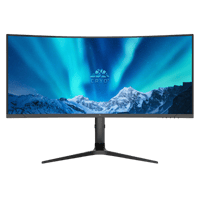
Ultrawide and super-ultrawide (21:9 and 32:9) is the immersion format: extra horizontal field of view in racing sims, flight sims and open-world games, plus genuine desk value for streaming and creative layouts. The trade is frame-rate budget - ultrawide resolutions ask roughly a third more GPU work than 16:9 at the same height, so pair them with the stronger tiers. In range: the iiyama 45” dual-QHD (5120x1440) curved 165Hz at £474.99. Chillblast’s sim-racing PC line makes the pairing natural.
What else should I check before buying a gaming monitor?
1. Ports: high refresh at high resolution needs DisplayPort 1.4 or, on newer panels, HDMI 2.1 - the MSI rows above list HDMI 2.1 explicitly
2. Stand and mounting: height/pivot stands vary by model; most 27–32” panels take a VESA arm if you would rather float it off the desk.
3. Dead-pixel and warranty terms: PC systems carry a five-year warranty; monitor cover is separate and listed per model - check the terms on the product page rather than assuming equivalence.
4. Upgrade timing: buying 4K for a 5060-class card means paying for a mode you cannot run; dual-mode defers that decision at no extra cost.
How do gaming monitor delivery and ordering work?
Most gaming monitors in stock ship next working day when ordered before the evening cut-off - each listing carries a next-day delivery badge where it applies. PC and monitor in one order is the reason to buy the pair together: Chillblast builds and delivers any non-water-cooled system within 7 days, and the Help Me Choose guide matches GPU tier to panel so the two arrive working as a set. Returns follow the standard online-purchase rights; check the listing terms before ordering.
What mistakes should I avoid when buying a gaming monitor?
The big two:
1. Buying refresh you cannot feed. A 240Hz esports panel driven at 90fps in story games is a 90Hz panel you overpaid for.
2. Buying 4K for a mid-tier card. You will play everything at 60fps with upscaling maxed, which is the resolution-and-refresh compromise twice over.
And the rest:
1. Trusting “1ms” without checking the measurement - GtG is the number that predicts smear; MPRT is marketing.
2. Skipping adaptive sync and then solving visible tearing with a pricier GPU.
3. Mounting a curved ultrawide too close - curvature pays back only at matched viewing distance.
4.Chasing a spec the shop does not stock - compare against what is actually listed before cross-shopping a 4K 240Hz phantom.