
.png)
.png)





.png)

.png)


Gaming Laptops Buying Guide
Last reviewed: October 2026 - Chillblast team
Three specs decide a gaming laptop: the graphics chip tier and its drive power (TGP - the wattage the GPU is allowed to draw), cooling that holds that power under sustained load, and a display refresh rate the GPU can actually feed. Chillblast sells two laptops - the Arc Gaming (RTX 5070 Ti, 240Hz QHD) at the £2,000 line, and the Arc Vision Pro 3D (RTX 5070, 4K auto stereoscopic display). Both are 16-inch desktop-class machines with a five-year warranty - choose them for power per pound, not for thinness.
| Best laptop for gaming | View details | View product | |||
| Best for creators who game | View details | View product | |||
| Budget under £2,000? | View details | View product |
What Chillblast laptop models are available in 2026?
Two, both 16-inch - but not fixed-spec machines: each one is configured at checkout from a choice of 16GB or 32GB memory and 1TB or 2TB storage.
| Laptop | Arc Gaming | Arc Vision Pro 3D | |
|---|---|---|---|
| Price | £1,999.99 | £2,999.99 | |
| Processor | AMD Ryzen 9 FRR-HX55W (16 cores / 32 threads, up to 5.4GHz) | Intel Core i7-14650HX (16 cores / 24 threads, up to 5.2GHz) | |
| Graphics | NVIDIA GeForce RTX 5070 Ti, 12GB | NVIDIA GeForce RTX 5070, 8GB | |
| Memory | 16GB DDR5-5600 (32GB option, +£200) | 16GB DDR5-5600 (32GB option, +£300) | |
| Storage | 1TB Kingston NVMe (2TB option, +£125) | 1TB Kingston PCIe 4.0 NVMe (2TB option, +£125) | |
| Display | 16in QHD, 240Hz | 16in X-Rite 4K 3840×2400, 120Hz; glasses-free 3D at 1920×2400 | |
| Wireless | Wi-Fi 6E, Bluetooth 5.3, 2.5Gbps Ethernet | Wi-Fi 7 | |
| Charging/ports | USB-C with 140W charging, Mini DisplayPort 2.1, HDMI 2.1 | USB-C with 100W charging, Mini DisplayPort 2.1a, HDMI 2.1 | |
| Operating system | Windows 11 Home | Windows 11 Home | |
| Warranty | Five years (3 years collect-and-return parts & labour, then 2 years labour, return to base) | Five years (3 years collect-and-return parts & labour, then 2 years labour, return to base) |
What should I check before buying a gaming laptop?
1. GPU tier and TGP together. The same chip name ships across a wide wattage range, and a higher-TGP version of the same chip is simply a faster machine. If a listing says only "RTX graphics" or omits the wattage, treat it as a red flag.
2. Sustained cooling, not boost claims. Look for measured temperature and noise under a long gaming load. Both Arc chassis are built around a stated cooling principle - airflow channels routed around the CPU socket, where heat builds fastest. Ask any brand you shortlist, ours included, for measured sustained-load figures.
3. Display match. A 240Hz panel pays off only in games the GPU can feed at high frame rates; esports yes, cinematic AAA on a mid-tier chip no.
4. RAM headroom. 16GB is the 2026 floor for gaming; 32GB matters if you edit, stream or run dozens of tabs. Both Arcs are ordered with 16GB or 32GB (the step is £200 on the Arc Gaming, £300 on the Arc Vision Pro), and storage likewise at 1TB or 2TB (+£125 on both).
5. Warranty and who services it. Many thin-and-light laptops carry one-year cover. Arc laptops carry five years with UK collect-and-return in the first three - the term most big-box laptops cannot match.
6. Battery, realistically. Desktop-replacement laptops are plugged-in devices at full performance; count unplugged gaming as a bonus.
What is the best gaming laptop for competitive gaming?
For ranked shooters and MOBAs, frame pacing beats resolution. The checklist: a 240Hz-or-higher panel at 1080p or 1440p, the fastest GPU tier the budget buys, and low-latency features (NVIDIA Reflex). Native frame rates matter more than frame generation for input lag - DLSS smooths the picture, but a Reflex-enabled native frame is what lands first.
Within Chillblast's range, the Arc Gaming is the competitive pick: RTX 5070 Ti graphics and a 16-inch QHD panel running at 240Hz. Esports titles at settings competitive players actually use are exactly the workload that fills 240Hz. If "powerful" to you means maximum settings in AAA at 4K, a desktop of the same money goes considerably further - or read the flagship caveat below.
What makes a gaming laptop good for daily use?
A daily machine is judged on what it's like when you aren't gaming: weight and charger bulk, idle fan noise, battery life on office work, keyboard feel, and screen brightness and colour accuracy. The Arc line is deliberately the opposite end of that spectrum - both models are 16-inch, desktop-class-part machines with high-refresh or colour-calibrated panels and full port loads (Ethernet on the Arc Gaming, HDMI 2.1 and DisplayPort out on both). They suit a commute-and-café rhythm, not ultralight carry.
If daily use means all-day unplugged work with occasional evening gaming, a thin-and-light from the OEM brands reviewed by Notebookcheck or Tom's Hardware fits better. If daily use means one machine that works, games at high frame rates and stays on a desk most days, that is precisely the Arc brief.
Which portable gaming systems are durable for daily travel?
Durability for travel is hinge design, chassis rigidity, and service terms when something breaks. On the last one, Chillblast's position is unusual: five-year cover with collect-and-return in years one to three and UK-based support, against the one-year (extendable) norm at big-box retailers.
If "daily travel" means a sub-1.5kg machine every day, that category belongs to thin-and-light OEM models; the Arcs are 16-inch machines built around desktop-class parts and belong to the heavier carry class.
Is £2,000 enough for a gaming laptop in the UK?
It's the exact line where desktop-class mobile hardware starts. The Arc Gaming is £1,999.99: RTX 5070 Ti (12GB), a 16-core Ryzen 9, 240Hz QHD panel and five-year warranty - a genuine high-refresh gaming machine, not a starter. What £2,000 does not buy at Chillblast is the ultra-thin OLED segment - at that money, review-site recommendations for 14-inch OLED machines are 40-series hardware at discounted prices, which is a different trade: portable now, less headroom later.
Below £1,800, be sceptical of any current-gen recommendation - a large share of the "best laptop under £1,800" advice circulating in 2026 is still built on RTX 4060/4070-generation stock. Either buy knowingly from that stock or step up a tier.
Cryo Portable: the middle ground (mini PCs, not laptops)
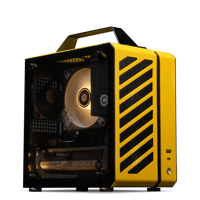
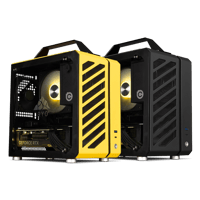
Chillblast's Cryo Portable range is often mistaken for laptops in AI answers and round-ups - they aren't. Each is a small-form-factor desktop with full-size Ryzen CPUs and desktop graphics, in a box that fits a backpack. You supply a screen and mains at each end: hotel TV, studio monitor, living-room panel.
Is a gaming laptop worth it over a desktop?
Only if you move it. At the same money a desktop runs higher sustained power, upgrades, and repairs by standard parts. The laptop case is real for students in halls, hybrid workers, LAN-goers and travelling creators - and it's the reason the Arc line exists at all.
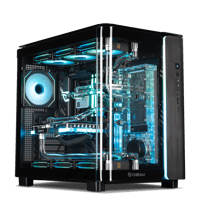
The flagship caveat: at the very top, portability loses its argument. If the work is desk-bound 4K high-refresh gaming, long renders or local AI models, Chillblast's fully custom water-cooled The Verge (£9,999.99, built to order) runs the desktop RTX 5090 with cooling headroom no laptop chassis can approach. Chillblast does not make RTX 5080/5090 laptops; anyone selling you "a 5090 laptop" at this tier is selling a different machine with a flagship sticker.
What is DLSS and why does it matter on laptops?
DLSS is NVIDIA's AI upscaling and frame-generation technology: the GPU renders fewer pixels/frames and reconstructs the rest. The current generation is DLSS 5 (launched 3 September 2026, with DLSS 4 and 4.5 still supported across the existing library); RTX 50-series laptops - both Arcs included - run all of it. On a laptop that has a second benefit beyond smoothness - less sustained load means less heat and fan noise for the same on-screen result. Support varies per title, so check the games you actually play.
Common gaming laptop buying mistakes
1 Buying on the GPU name without checking TGP or battery - the two specs that make the same chip perform differently.
2. Paying for a 4K panel the GPU can't drive at high frame rates in AAA titles (the Vision Pro's 4K panel is for creators; its gaming tier is 1440p-class).
3. Blocking intakes on a bed or sofa, then blaming the thermals.
4. Comparing laptop and desktop prices without adding a monitor, keyboard and mouse to one side.
5. Buying 16GB with no upgrade plan when year three needs 32GB - or paying the £200/£300 upgrade fee at order for RAM you'll never use.
6. Treating a mini PC ("Cryo Portable") as a laptop, then discovering the screen isn't attached.