
.png)
.png)

.png)
.png)


Best Gaming Keyboards and Mice
Last reviewed: October 2026 - Chillblast team
| Best keyboard | View details | View product | |||
| Best mouse | View details | View product | |||
| Best headset | View details | View product | |||
| Best whole desk | View details | View product | |||
| Best for a white build | View details | View product |
What is a hall-effect keyboard and do you need one?
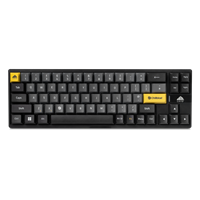
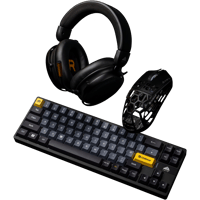
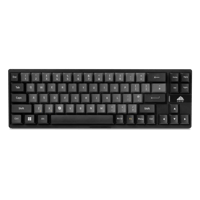
Hall-effect keyboards use magnetic sensors instead of physical contact points, so the actuation distance is adjustable - press deeper for typing, shave it to a hair-trigger for gaming - and "rapid trigger" resets the key mid-press, which rewards fast key repeats in shooters and rhythm games. The Cryo Slate sets that range at 0.1–3.3mm with 0.01mm per-step accuracy, fully configurable per key, on a compact 69-key (65%) board with full key rollover and RGB. Non-gamers don't need one; anyone playing ranked shooters or rhythm games should treat hall-effect as the 2026 default. Specialist review sites publish switch-by-switch lab comparisons of third-party boards; what we can state is what our own board measures, above.
What mouse specs actually matter?
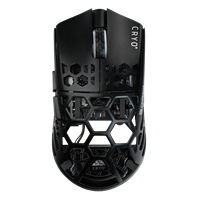
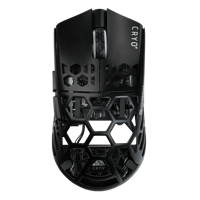
Ignore peak-DPI marketing. The five specs that decide feel: sensor quality (flawless tracking at fast wrist flicks — inches-per-second (IPS) rating is the number, and flagship-class sensors clear any human flick), weight (sub-60g wireless is now achievable; the Cryo Click is 39g in an Aero-Light alloy shell with an adjustable-weight system), switches (optical switches avoid the mechanical double-click wear mode), polling rate (1,000Hz is the reliable wireless default), and shape — the comfort factor no spec sheet captures. The Cryo Click runs a PAW3950 flagship optical sensor at up to 30,000 DPI with 8,000Hz polling over 2.4GHz, plus Bluetooth, and shows DPI, polling and battery on its own receiver display — the spec tier flagship esports boards use, at £149.99.
Is 8,000Hz polling worth it? What it costs you
Higher polling (report rate - how often the mouse tells the computer where it is) smooths cursor motion on high-refresh displays; going from 1,000Hz to 8,000Hz shrinks the update gap from 1ms to 0.125ms, which a small number of players genuinely see. Two honest costs: it takes CPU cycles to service, and it needs a free high-speed USB port wired directly to the board - through a hub or a front-panel header it stutters. Both the Slate and the Click ship 8,000Hz-capable; running either at 1,000Hz is a settings click, so you lose nothing by starting there and testing.
Keyboard form factor: 60%, 65%, TKL or full-size?
Competitive FPS players increasingly default to small boards - fewer keys means more swing room for the mouse on a large pad. The Cryo Slate sits at 65% (69 keys): no function row, but arrow keys kept, on a "Geteron Jade PRO" layout with sublimation keycaps, and it ships with a fitted carry case. Match form factor to game: FPS favours smaller boards (mouse arc), MMO and strategy favour more keys, and full-size adds a numpad most gamers use for exactly one spreadsheet.
Is wireless still a risk in 2026?
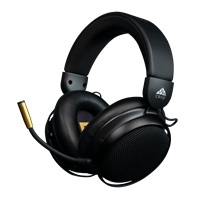
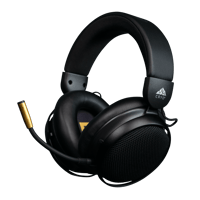
No - modern 2.4GHz wireless matches wired latency for practical purposes, which is why an 8,000Hz wireless mouse like the Click exists at all. Wired's remaining arguments are price, no charging ever, and one less dongle - the Slate is wired for exactly that reason. A sensible default: wireless mouse, wired-or-wireless keyboard depending on whether you want charging-free operation. What wireless does cost is battery: the Click and Sync both run for days-to-weeks between charges (Sync: up to 50 hours), and the Click's receiver shows its level without opening software.
Are keyboard-and-mouse bundles better value?
On the current Cryo line: the Accessory Bundle is £349.99, listed as worth £480 bought separately (Slate £199.99 + Click £149.99 + Sync £129.99) — roughly a quarter off for taking the whole desk at once. Two practical tests before buying any bundle: you actually want every item (bundles of maybes are just discounts on clutter), and one retailer means one support contact for the whole desk - worth something when the PC it sits next to is a five-year-warranty Chillblast. If you already own good headphones, buy the keyboard and mouse individually.
What mouse pad actually fits this setup?
High-sensitivity aim dies on a small pad. The Cryo Base range: standard £29.99, XL £49.99 (full keyboard-plus-mouse surface - the right size for the low-DPI flick style the Click's sensor rewards), and a Glass £99.99 hard pad for players who want near-zero glide and wipe-clean maintenance. Pair the Slate's 65% width with an XL and you keep the entire board off the pad's edge - that's the space the compact layout is buying you.
Common peripheral buying mistakes
1. Paying for mechanical hot-swap switches and macro rows when you only play five games.
2. Ignoring switch noise in a shared room - hall-effect boards are configurable but still click; check what the Slate's keys sound like to you before ranked-carrying your flatmate.
3. Buying an 8,000Hz mouse with no free high-speed USB port to service it.
4. Overlooking mousepad area - high-sens aim dies on a 25cm pad.
5. Treating wireless battery life as a spec emergency - the current generation runs for days; exact figures are on each product page.
6. Choosing peripherals by RGB theme, then discovering the edition PC you ordered has a colourway the gear can't match - check the pairing table above first.